
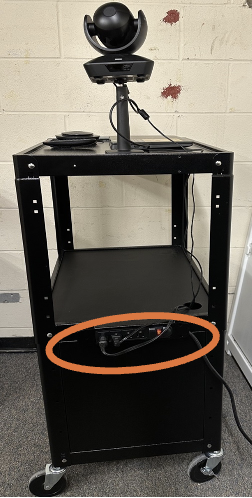
- Plug the cart’s power cord into an outlet. Power for camera and laptop are stored in the cabinet of the cart and should be already plugged in.
- Turn the laptop on/make sure it is connected to its power cable.
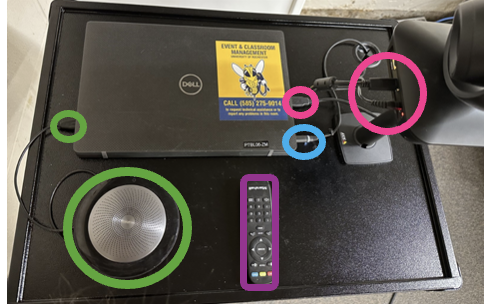
- Click the power button on the Jabra speaker/microphone, it should turn a white led on.
- Make sure there are 2 USB cables connected to the laptop. One connects the speaker/microphone and the other connects the camera. Jabra can be used via Bluetooth dongle if needed to be portable.
- Make sure the camera has two cables plugged into it – one for power, one for the laptop
- Laptop should automatically log in and connect to UR_Connected – restart if there is an issue – may take 3-5 minutes.
- Open and join a Zoom meeting.
- If you are recording the meeting, you must record it on a personal laptop (the recording will not be saved on the cart’s laptop). Mute Zoom on personal laptop to avoid feedback noise.
- Make sure the Zoom audio is connected to Jabra Speak (speaker/microphone) and camera is connected to CV610 (camera). They should automatically be selected.
- You can use the remote to control the camera direction, using the camera 1,2,or 3 button.
When returning the zoom cart, make sure all components are present and return to Hoyt.
Plug the cart in to charge while not in use. Make sure Jabra is plugged into laptop and charging.
 |  |