
- Carefully slip the protective case off the Samson speaker.
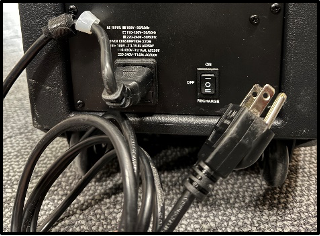
- Uncoil the power cable. Ensure one end is plugged into the speaker, and plug the other end into a wall outlet.
- Flip the ON/OFF/RECHARGE switch to the ON position.
- Press and hold the PAIR button under the BLUETOOTH section on the speaker. The blue light will begin to flash, and you will hear a beep.
- Pair your device to the speaker. The speaker’s name will appear as ‘SAMSON BLUETOOTH’. You will hear a beep once you have successfully paired your device.
- Turn the volume up to the maximum level on your device.
- To adjust the volume of the music playing from the speaker, turn the VOLUME knob under the BLUETOOTH section on the speaker. Turning the knob counterclockwise will turn the volume down. Turning the knob clockwise will turn the volume up.
- If necessary, you can also adjust the VOLUME knob under the MASTER section. This will raise or lower the volume of all sources connected to the speaker, including a Bluetooth device.
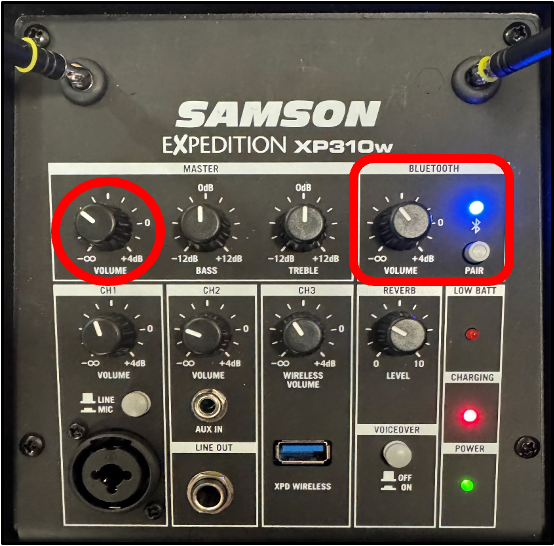
Optionally, you can adjust the BASS and TREBLE knobs to increase or decrease the level of the low and high frequencies in the music, respectively. Unless you are familiar with equalization, it is best practice to leave these knobs at 0 dB (the center line).
When you are done using the speaker, flip the ON/OFF/RECHARGE switch to the OFF position before unplugging the power cable.
Coil the power cable, and secure it with the attached Velcro.
Slip the protective case back onto the speaker.
Samson Speaker: Bluetooth Music Playback Print
Modified on: Tue, Mar 3, 2026 at 2:48 PM
Did you find it helpful? Yes No
Send feedbackSorry we couldn't be helpful. Help us improve this article with your feedback.